
Stop Getting Rejected by Google AdSense
Find Out Exactly What’s Blocking You
Most sites fail approval due to hidden issues across multiple pages. Scan your site, uncover every blocker, fix them step-by-step, and reapply with confidence.
⚠️ Free scan checks limited pages. Full audit reveals hidden issues.

*Based on user testimonials after applying recommended fixes. AdSense approval is decided by Google.
Why Most Sites Get Rejected Again and Again
Most site owners fix one issue, reapply, and get rejected again. Not because nothing changed — but because multiple hidden issues still exist.
- Thin or low-value content on key pages
- Missing trust pages (Privacy, Contact, About)
- Unclear site purpose
- Hidden policy risks
- Technical crawl and structure issues
👉 Most users need multiple scans before reaching full approval readiness.
The rejection loop is expensive when your site is built to monetize
You invested in content, product, and traffic. Yet Google still responds with vague rejection language and zero operational clarity. Every delay pushes revenue further out.
Applied 2, 3, even 4 times — still rejected
Each reapplication takes weeks of waiting and the same vague response appears again. You start wondering if AdSense is even possible for your type of site.
"Low-value content" — but which pages and why?
Google's rejection reason is a black box. It could be your tool pages, navigation, or missing trust pages — you're guessing in the dark while competitors get approved.
Hours reading forums and guides — going nowhere
Every thread gives different advice. None of it is specific to your site's actual problems. Generic tips don't fix specific blockers.
Know exactly what to fix before your next submission
A prioritized, page-by-page remediation plan specific to your site. No guesswork. No generic forum advice. Just a high-confidence path to AdSense approval.
See exactly what's blocking your AdSense approval
Enter your domain and receive a prioritized, page-by-page audit. Built for single sites, large content properties, SaaS platforms, and multi-site portfolios.
Built for publishers who can't afford guesswork
Ideal for utility platforms, SaaS sites, content businesses, and operators preparing serious monetization rollouts.
Exact pages, exact issues — ranked by business impact
Every finding shows the affected URL, the likely approval risk, and the remediation priority.
Use before every high-stakes reapplication
Validate fixes, reduce uncertainty, and submit only when your site is materially stronger.
Designed to shorten the road to monetization
When approval delays are expensive, clarity is worth more than another month of trial and error.
Site owners who stopped guessing — and got approved
Real results from real site builders. Every review is from a verified user.
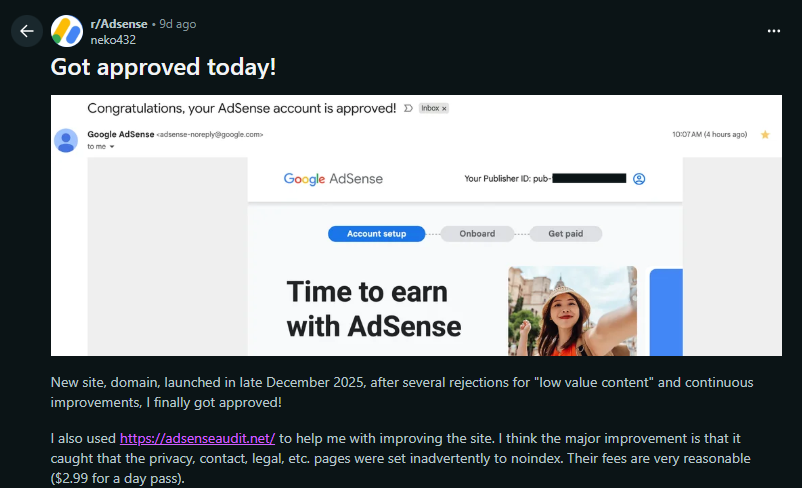
From cryptic rejection
to approved in days
Your site can look perfectly normal to a human visitor and still trigger every automated quality signal Google checks. Our audit reads your site the way their system does.
We crawl your site like AdSense would
Enter your domain. We check every page for content quality, trust signals, crawlability, link structure, and 50+ signals in minutes.
You get a prioritized fix list — page by page
Not "improve your content." Exactly which URLs are flagged, why they're flagged, and what to add or change on each one.
Fix, re-audit, then apply with confidence
Run the audit again after your fixes to confirm every issue is resolved — then submit knowing your site is truly ready.
Every signal AdSense looks for — surfaced in one report
Nothing is missed. Nothing is vague. Every finding explains what it is, why it matters, and what to do about it.
Trust & Policy Pages
Checks for Privacy Policy, Terms, About, and Contact — the pages Google reviewers look for before anything else.
Indexability & Crawl Signals
Status codes, redirects, canonicals, robots/noindex directives, and broken internal links that block crawling.
Thin & Low-Value Content
Flags pages with too little useful text, repetitive templates, and poor information density — the #1 rejection cause.
HTML & Schema Quality
Broken HTML and JSON-LD issues that harm rendering and perceived quality. Broken code signals low-quality content to automated reviewers.
On-Page Essentials
Title, H1, and meta description completeness — plus readability and link-to-text ratio signals that influence scoring.
Prioritized Action Report
Every finding includes what it is, why it matters, and exactly how to fix it — ordered from highest impact to lowest.
Audit reports you can act on immediately
Every finding includes a severity rating, a plain-English explanation of the issue, and the exact steps to fix it. No decoding. No interpretation required.
Common questions
Everything you need to know before running your audit.
Why does AdSense say 'Your site isn't ready to show ads'?+
This message can be caused by content quality issues, insufficient unique content, navigation/UX problems, policy compliance gaps, or technical crawl issues. A site audit identifies the specific pages and signals to fix before reapplying.
Can I reapply after being rejected?+
Yes — after addressing the issues, you can request another review. The key is making meaningful, specific changes before you reapply. Our re-audit feature lets you confirm every issue is resolved before submitting, so you're not just hoping.
Does a utility site need blog content to get approved?+
Not exactly. Utility sites struggle because tool pages look similar and often appear thin. Adding helpful supporting content — how-to guidance, FAQs, examples, and clear navigation — significantly increases perceived value without requiring a full blog.
Is this tool affiliated with Google?+
No. This is an independent audit that surfaces technical signals and heuristics based on AdSense's published guidelines and known rejection patterns. Google always makes the final approval decision — we just help you understand and fix what's likely causing issues before you apply.
How do I get my site approved for AdSense?+
Your site needs original, high-quality content, full Google policy compliance, and clear trust signals — Privacy Policy, Contact info, and well-structured navigation. Approval is based on site quality and user value, not traffic volume.
What are the most common AdSense mistakes to avoid?+
Thin or duplicated content, missing trust pages, unclear site purpose, poor navigation, and applying before having enough high-quality indexable pages. Utility and tool sites are also often flagged for having pages with insufficient supporting text or a weak content-to-tool ratio.
How many page views do you need for Google AdSense?+
Google AdSense has no minimum traffic requirement for approval. Reviewers evaluate overall site quality — original content, clear structure, trust signals, and navigation — not visitor counts. Many sites are approved with very low daily traffic if they demonstrate real value and full policy compliance.
Resolve the exact AdSense issue holding your site back
Strategic guidance for publishers, operators, and teams who need precise answers to approval blockers, policy risk, and technical weaknesses.
AdSense Rejected: Why Google Denied Your App…
The 8 most common rejection reasons and how to fix each one before reapplying.
"Site Not Ready to Show Ads" AdSense Error: …
Every reason 'site not ready to show ads' appears and what to do about each one.
AdSense Not Approved? Here's Exactly What to…
Follow the exact steps to diagnose the reason, fix it, and reapply with confidence.
AdSense Policy Violation Fix: How to Resolve…
Content, behavior, traffic, and UX violations — and the exact steps to resolve each type.
AdSense Technical Issues: Fix ads.txt, HTTPS…
Fix ads.txt, HTTPS, ad code, page speed, and every other technical blocker to AdSense revenue.
Low Value Content AdSense: Why It Gets You R…
What triggers the low value content flag and how to rewrite your site to pass review.
Stop submitting on hope.
Submit when your site is truly ready.
AdSense rejections are rarely random. Your site is failing specific checks, and Google rarely tells you which ones. Run the audit, correct what matters, and reapply with the confidence that comes from operational clarity.
✦ Audit My SiteBuilt for serious publishers, SaaS operators, agencies, and portfolio owners